The Find Similar Verses dialog helps you study a verse (or passage) and its words by giving you a quick way to see how the words are used elsewhere in Scripture, or to find verses that have a similar semantic structure.
You can access the Find Similar Verses dialog on the main Search menu, or by right-clicking a verse and selecting Find Similar Verses, or with the Find Similar Verses Widget.
This tool has two modes: Find by Semantic Similarity and Find by Keywords.
As an example, study John 3:16. In the Bible panel, right-click the verse and select Find Similar Verses from the pop-up menu: (You can also do this in a Verse List when reviewing search results.)
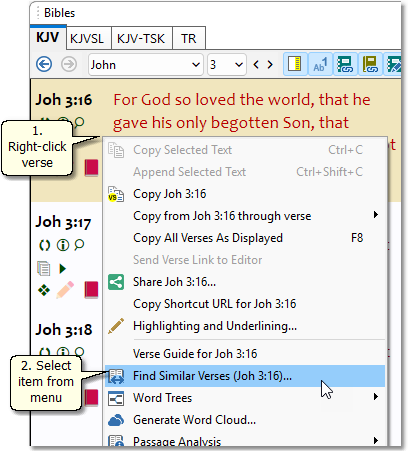
Sample Bible panel showing pop-up menu with Find Similar Verses
Find by Semantic Similarity
Think of this as "finding verses that are like this one" by meaning or structure.
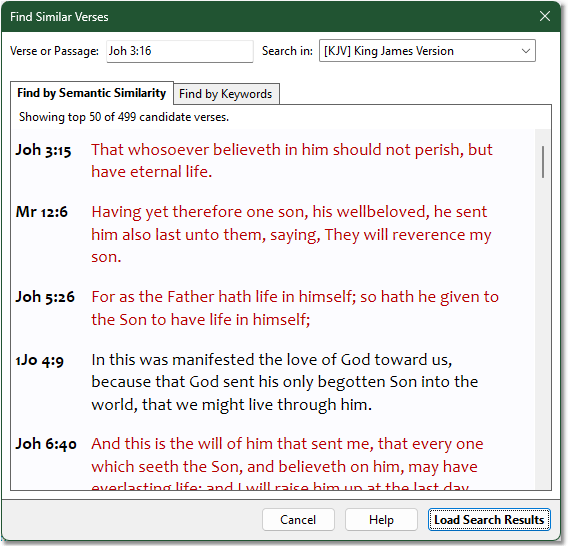
Sample Find Similar Verses dialog showing Find by Semantic Similarity
You'll see up to 50 verses, ranked so that the most-similar verses appear first. Click Load Search Results to load the full results into a Verse List panel.
The By Similarity method can discover related verses that share no common words with the verse being studied, making it a powerful complement to the keyword-based method explained below.
Tip: Not all of the verses shown will be relevant, as as you go down the list, you will get a sense that the verses become less and less similar to the one you are studying.
Find by Keywords
This is a search function reduces the amount of time you would otherwise spend typing search words during a study.
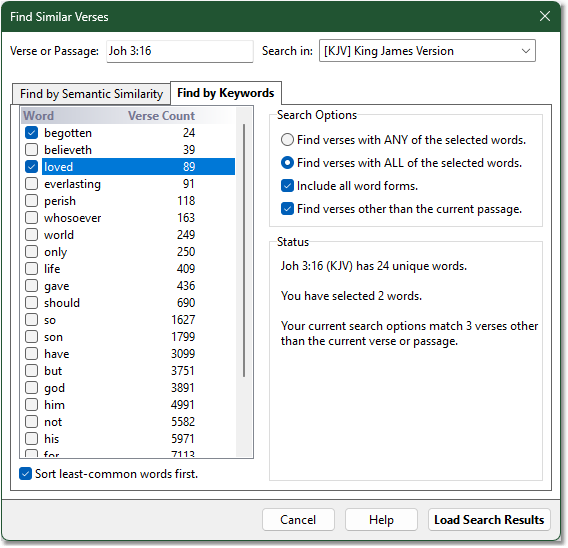
Sample of finding similar verses using keywords
The words from the verse are listed in the box on the left, sorted so that the least-common words appear first. With the word list sorted this way, you can get immediate ideas for further study. For example, check the boxes next to "begotten" and "loved."
Next, see Search Options on the right. Here is where you can control your search. Select the "ALL" words method and Include all word forms. This tells SwordSearcher to find verses with all of the words checked on the left, and to include all word forms of the selected words. Notice that as you select words and change the search options, the Status section updates to tell you how many verses will be found. This way you can easily refine your search, adding words or changing options to get a result list of a useful size.
Click Load Search Results to perform the Bible search. The resulting verses appear in a Verse List, just like any other Bible search:
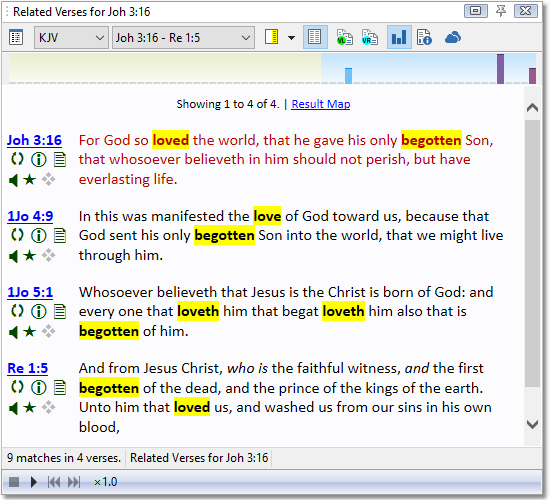
Sample Verse List showing similar verse search results
All three of the additional verses are excellent cross-references. Note that because we used Include all word forms, 1Jo 4:9 (with "love" instead of "loved") and 1Jo 5:1 (with "loveth" instead of "love") have been included.
Spend some time experimenting with the Find Similar Verses dialog. You will find that it is a great way to learn how words are used throughout the Bible and it is sure to enhance your study, making it convenient to compare Scripture with Scripture.
You can type any verse or passage in the Verse or Passage text entry box. However, this tool is most useful with small portions of Scripture. Try to keep it down to a chapter at most.
Select Find verses with ANY of the selected words if you want to see how a group of words are used elsewhere but not necessarily together. Select Find verses with ALL of the selected words if you only want to find verses that use the same words you have selected together.
The Find verses other than the current passage controls how the Status section shows the results of your current options. It helps you avoid performing a search that would only return the same verse (or verses in the passage) you are studying. However, once a search is performed, the results will include all matching verses, even if they appear in the specified verse or passage.
If you want the word list to be sorted alphabetically instead of the default "least-common words first," un-check the Sort least-common words first option.
The Verse List right-click pop-up menu includes an option to Find Similar Verses for Entire Verse List. This pre-loads the word list with all of the words in the verse list. Again, this works better with small portions of Scripture.
If you find yourself using this search function frequently, you can add a Verse Widget for one-click access.