To open the Search Bible dialog, select Search Bible from the Search menu, or press F2, or click the Search Bible button on the Search tools toolbar. When the Search Bible dialog is already visible, pressing F2 rotates through the search tabs (Keyword, Proximity, etc.) and automatically selects the search text entry box.
Note that if all you want to do is search for a few words, you may wish to use the Go to Verse and Search Toolbar on the main window instead.
This is what the Search Bible dialog looks like:
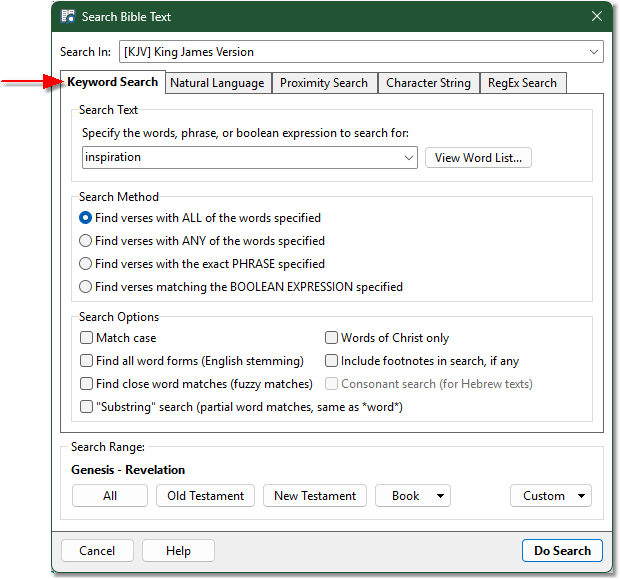
Sample Search Bible dialog with Keyword Search visible
There are several search types: Keyword, Natural Language, Proximity, Character String, and RegEx. The vast majority of your searches will be performed with the Keyword Search type.
Keyword Search is described below. See Proximity Search, Character String Search, RegEx Search, or Natural Language Search for details on those search types.
Keyword Search
Search In: Choose which Bible text to search here. Press Alt+I to invoke this selector (or just click it). You can also set the search module with a custom Module Shortcut.
Search Text: Specify the word, words, phrase, or expression to search for here. Click View Word List to help find words to search for with the Word List dialog.
Search Method controls how your search will be performed.
Find verses with ALL of the words specified finds verses that have each word from your Search Text. This is equivalent to a "logical and" search.
Find verses with ANY of the words specified finds verses that have at least one of the words from your Search Text. This is equivalent to a "logical or" search.
Find verses with the exact PHRASE specified finds verses that have all of the words from your Search Text, in the exact order that you provided them. This has the same effect as putting your search words in quotes: "this is a phrase". If you put your search words in quotes, phrase searching is assumed whether or not you select this option.
Find verses matching the BOOLEAN EXPRESSION specified interprets your Search Text as a Boolean expression, described in Advanced Search Expressions. This option is included for clarity, but using any of the Boolean operators described in Advanced Search Expressions (&, |, !, ^) will automatically force expression evaluation, so it is not strictly necessary to select this option when using Boolean operators.
Search Options provide additional control over how words will be compared during the search.
Match case makes your search a "Case Sensitive" search. With this option selected, searching for lord would find verses that have the word lord but only in lower case, so Lord would not match lord.
Find all word forms performs "English stemming" reduction on each word and searches for any form of the words specified. With this option, a search for love would find loves, loving, lovest, loveth, etc. This only works with English text. It is algorithmic, so it is not always 100% accurate.
Find close word matches performs "fuzzy matching" comparisons on words. A search for color would find colour, colours, etc. This can be useful when you are unsure of the spelling of a word, but can often match unrelated words. To find words to search for when you are unsure of the spelling, it may be easier to use the Word List dialog instead.
"Substring search" finds partial word matches. With this option selected, searching for god would find god, godly, ungodly, etc. This is equivalent to using a wildcard on each end of each word (*god*). Wildcards are explained below.
Words of Christ only limits your search to "red letter words" in the selected Bible module. This only works when the selected module supports red-letter display (such as the KJV). See also Search KJV Words of Christ.
Include footnotes in search tells SwordSearcher to include the margin/translator notes in the verse text when searching. Not all Bible texts have footnotes.
Consonant search is for Bible modules containing Hebrew text, such as the Old Testament in the Textus Receptus module. Selecting this option ignores vowel points during searching.
You can apply most of these search options on a per-word basis by using Advanced Search Expressions.
Search Range
Search Range allows you to specify which verses to search. Choose All to search the entire Bible. Choose Old Testament or New Testament to limit your search accordingly. Use Book if you wish to limit your search to a single book in the Bible.
You can specify a custom search range by clicking the Custom button. A custom search range can be manually typed and may contain multiple books, non-contiguous ranges, specific chapters, etc. Selecting Custom > Manually enter search range opens an input dialog in which you may type ranges like "Joh 1-5" or "Ge-Re" or "Psalm 23; 119" etc.
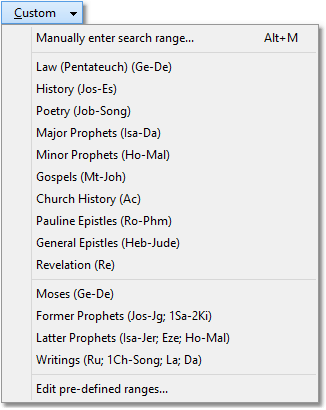
Sample "Custom" search range menu. Pre-defined search ranges can be edited by the user.
The Custom search range menu includes a variety of pre-defined search ranges. You may add, remove, or change items in the pre-defined search range list by selecting Custom > Edit pre-defined ranges.
Do Search
Clicking Do Search will perform your search and load the matching verses, with matching words highlighted, in a Verse List panel.
Wildcards
Any time you want to search for words that begin with or end with some letters, use a wildcard (*). Searching for god* would find god, godly, etc. Wildcards can be used before, after, and inside of a word.
You can use the wild character symbol (?) to replace a single character. Searching for lo?e would find love, lose, etc.
Searching for Strong's Numbers
You can search the KJV and KJVSL Bible modules for Strong's Numbers to find instances of similar original language words in the KJV. To search for a Hebrew Strong's number, prefix the number with an H (like H1234). To search for a Greek Strong's number, prefix the number with a G (like G1234). See the King James Version with Strong's Links for details on using the KJVSL and Strong's Links.
Natural Language Search
The Natural Language tab lets you search for Bible verses by meaning and concept rather than exact words. Type a description of what you are looking for, such as "comfort for those who are grieving" or "God's faithfulness," and results are ranked by relevance.
This tab is available when the natural language search data is installed. For more information, including the dedicated Find Verses About dialog and search bar integration, see Natural Language Bible Search.
Can't find a verse you know is there?
Here are some things to check if SwordSearcher can't find a verse you are looking for.
•Are you searching the right Bible text? Make sure you're not searching a non-English text, like the Textus Receptus, for an English word.
•Are words spelled correctly? A common mistake is to search the KJV with American spellings of words like colour, favour, or saviour. Use the close word match option or the Word List dialog if you are unsure about the spelling of a word or name.
•Are you searching the right range of verses? If you've previously restricted your search to the Old Testament, then go on later to search for a word that appears only in the New Testament, no verses will be found. Click All under Search Range and try your search again.
•Are you using Match Case unnecessarily? If you've selected the Match case Search Option, but search for jesus, no words verses will be found because it only appears as Jesus or JESUS. Be sure to un-check Match Case unless you are sure you need it.
•Are you looking for words that may appear near each other but not necessarily in the same verse? In that case, use a Proximity Search.
•Try using Natural Language Search if you are having a hard time finding a verse you "know is there."